FAQ Watchdog
目的
正確的時機下使用 watchdog feed,避免用錯地方導致功能無法正常執行
前情提要
Simulator 並沒有 watchdog 相關功能,因此要實際下載至板子進行操作
實驗:寫一個 busy_function 在不同 widget function,並加入 watchdog feed 來測試是否能避免 watchdog reboot
1. busy function 寫在 Python Code Widget 裡 (未加 watchdog feed)
結果:
-
busy function 跑17秒以下可以正常開機 / 18 秒以上會觸發 watchdog reboot 一直重開機
-
觸發 watchdog reboot 後,若無拔除 USB,因為 reboot 時偵測到 USB 訊號,所以會進入到 load fw mode,若在重開機後馬上重新插拔 USB console 就會重新讀取 busy function
2. busy function 寫在 Python Code Widget 裡 (加上 watchdog feed)
結果:
- watchdog feed (也就是 core.htm.wdt.feed()) 加在 busy function 裡後 console log 會出現 Attribute error: -> ==Error: The attribute or method does not exist - ‘NoneType’ object has no attribute ‘feed’== 但不會觸發watchdog (因為跳到except),沒加try-except就會觸發 watchdog reboot
3. busy function 寫在 Timer、Generic Button Widget 等 (未加 watchdog feed)
結果:
- 會觸發 watchdog reboot 一直重開機
4. busy function 寫在 Timer、Generic Button Widget 等 (加上 watchdog feed)
結果:
- 成功呼叫 watchdog feed,不會觸發 watchdog reboot, busy function 跑完後其他功能可以照常使用
了解 watchdog feed (core.htm.wdt.feed()) 被設定的時間點
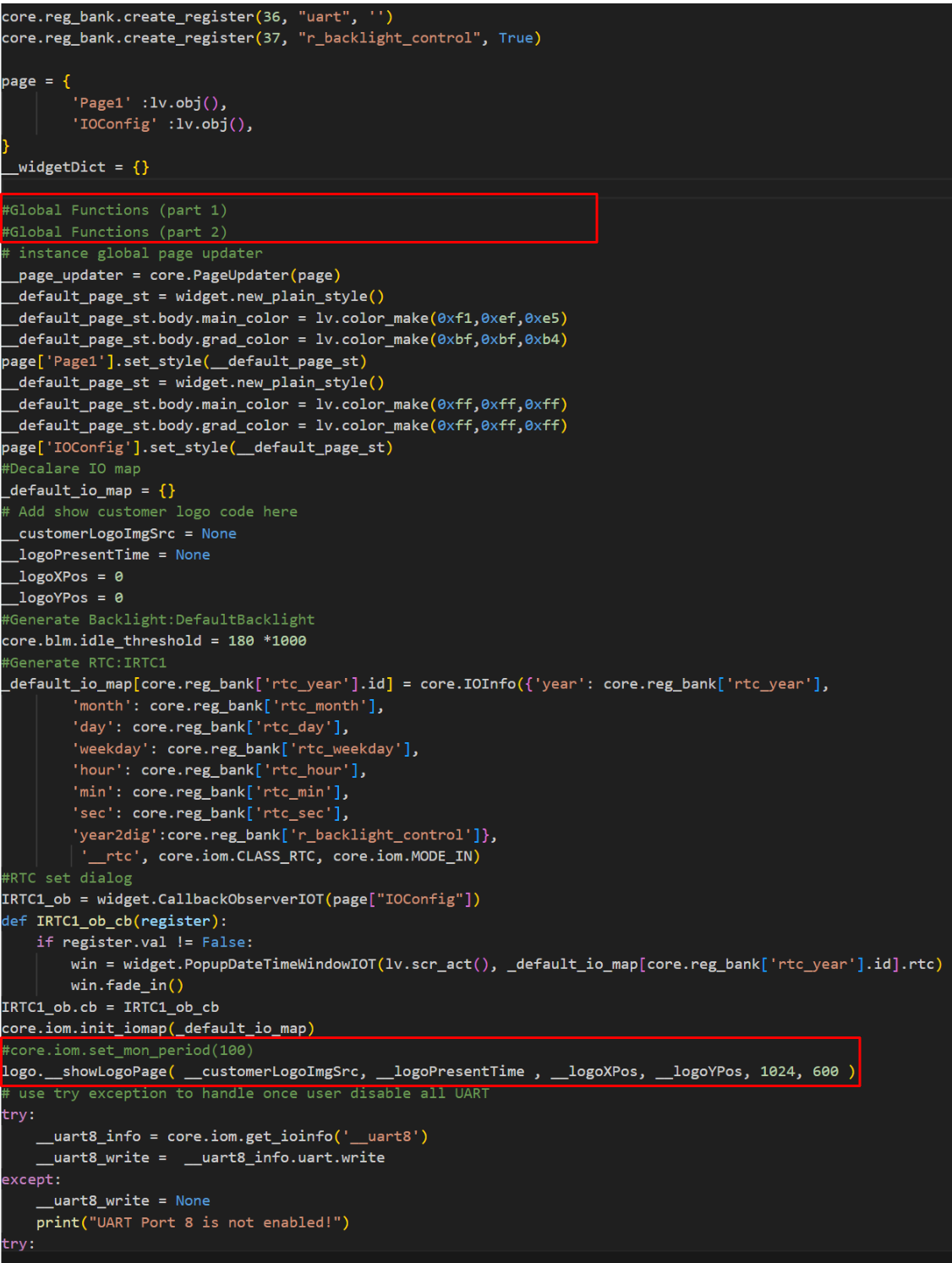
watchdog feed 設定的時間點比執行 Python Code Widget 還要晚,因此如要新增 watchdog feed,應該在其他 widget 裡面設定,例如:Timer widget 讓它定時去呼叫 watchdog feed,避免 watchdog reboot
備註:
- ui.py 檔案內,有一行 logo.__showLogoPage() 會呼叫 core.htm._start_task_handler(),這裡包含了 feed 的設定。在此之前,Python Code Widget 的內容已經在參考圖中 global function 的位置被執行了 (早於呼叫 logo.__showLogoPage() 的時間點),因此不能把 core.htm.wdt.feed() 寫在 Python Code Widget
參考圖:
總結
-
若要使用 watchdog feed,避免將 core.htm.wdt.feed() 寫在 Python Code Widget 裡,應寫在如 Timer Widget 裡面,定時呼叫,避免觸發 watchdog reboot
-
善用 try-except,透過 console log 了解錯誤訊息,幫助排除問題 (參考 Try-Except)
-
Simulator 並沒有 watchdog 功能,因此需實際下載至板子操作
-
注意開機模式是否為 load fw mode (上電前就接上 USB 會進入此模式)或者正常開機模式(上電後再接上 USB 會進入此模式, 此時可以看到 console log 幫助錯誤處理)
實例:設計一個 busy_function 在 Timer Widget 裡,並加上 watchdog feed 避免觸發 watchdog reboot
try:
    import core
    def busy_function(duration):
        print('Busy function starting for {} seconds...'.format(duration))
        start_time = time.time()
        while time.time() - start_time < duration:
            # 繼續做計算或保持繁忙
            _ = 0
            for i in range(10000):
                _ += i
            ##call watchdog feed
            print("Feed watchdog.")
            core.htm.wdt.feed()
            print("Watchdog feed successfully.")

        print("Busy function completed.")
	busy_function(30)
except Exception as e:
    print('Error Msg:{}'.format(e))